More About Virtual Networks

Virtual Networks / Cloud Solutions FAQ

What are the Advantages & Benefits of a cloud-based, virtual network?

  • Enable productivity from anywhere.
  • Continuity of business applications, regardless of user location.
  • Highly scalable – apply additional resources, as needed.
  • Only pay for the resources (CPU, RAM and storage) that are actually used.
  • Deploy new workstations in minutes (instead of days).
  • Connect with practically any device.
  • No need for expensive, design-grade computers.
  • Reduces capital expenditure and ongoing cost associated with on-premise servers.
  • The cost of disaster recovery is minimized.
Will we be able to print from our cloud network to our local printers?
Yes, there are two methods to print to your local printers:
  1. We can configure a dedicated link on your cloud desktop for every network printer in your local, on-premise network.
  2. Our remote client application also includes a feature that automatically redirects any printer already installed on your local workstation, laptop or other device. This option is ideal for remote users, working from outside the main office, wanting to print occasionally to a printer that is not part of the regular, on-premise network.
Will we be able to use multiple displays?
Yes, our remote client application supports multiple displays. For a typical desktop workstation, your cloud workspace can be displayed on some or all of the monitors in your local system.
What is the best way to connect to my cloud desktop?
There are two methods to connect to your cloud desktop:
  1. We can help you install and configure the appropriate remote client application for your device (Windows®, MacOS, Linux and most mobile devices, tablets, etc.).
  2. For workspaces not under your direct control (or to quickly initiate a secure connection to your cloud desktop), you can connect via a web browser on any device that has connectivity to the Internet.
Who owns the data on our cloud-based, virtual network?
The short answer:  you do.  The ‘digital real estate’ where all your virtual systems and data reside (on the Microsoft® Azure® platform, for example) is called a tenant, which is registered to your organization. We are merely your trusted agents, the vigilant custodians of your tenant.

What are main differences between an on-premise network and a cloud-based virtual network?

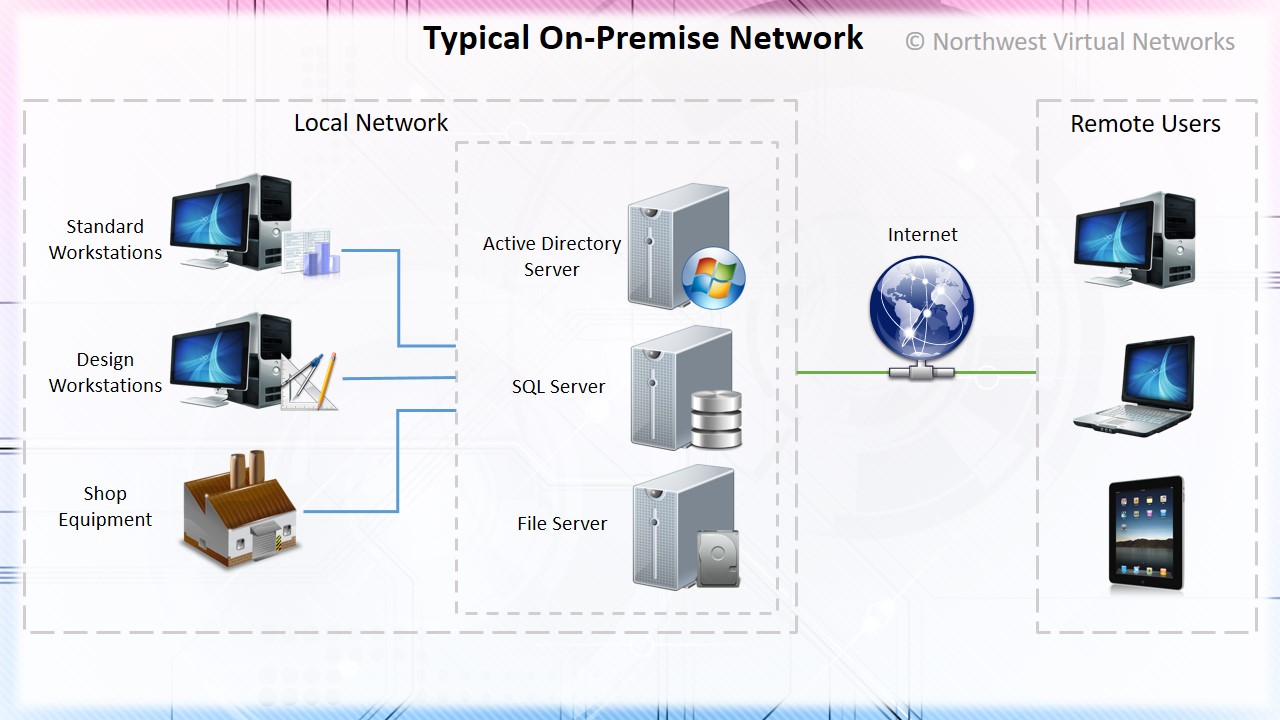
    Here is an example of an on-premise network for a typical manufacturing business. Except for the constant upkeep to maintain the servers, this scenario works fairly well when everyone is connected to a single location. Certain difficulties arise, however, when when a business is spread out over multiple locations; providing a secure means for remote access, sharing files and synchronizing large amounts of data across several locations can be an enormous challenge.
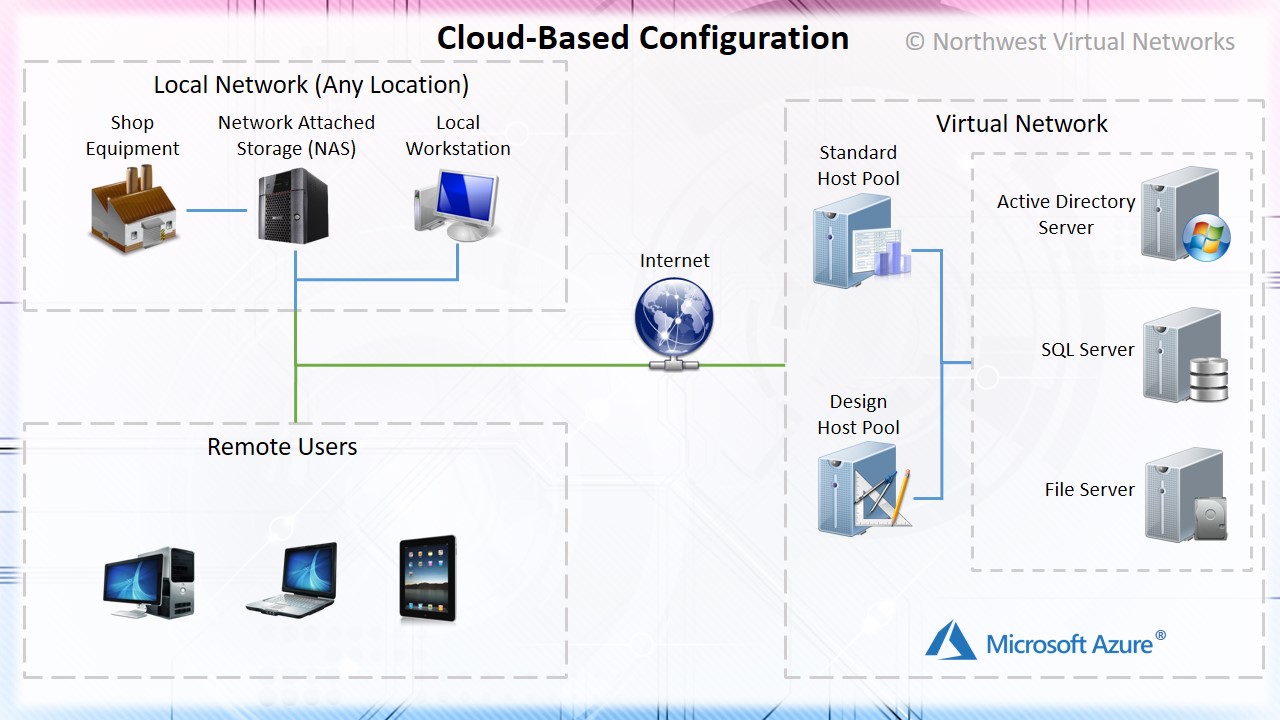
    This diagram shows a simplified view of a cloud-based network with all the same functionality as its predecessor, but now accessible from multiple locations simultaneously. A well designed virtual network can help resolve a myriad of issues and provide tremendous benefits for both small and large operations.

Is there support for CAD or other ‘GPU-intensive’ applications?
Yes, many of our customers use CAD or other graphics-dependent design applications, and the availability of dedicated GPU-enabled machine types provides an excellent platform for those applications that require enhanced graphics. Also, since most of the ‘heavy lifting’ in terms of graphics resources happens in the remote workspace, the need for expensive, design-grade workstations on the local desktop is eliminated.

What is Auto-Scaling, and how does it help manage costs?
Auto-scaling is a mechanism that automatically adjusts the capacity of resources in a cloud environment based on demand. In the context of virtual networks, auto-scaling ensures that the network infrastructure and services scale dynamically to handle varying workloads while maintaining performance and reliability.

Conclusion

Virtual networks represent a significant evolution in how networking resources are deployed, managed, and optimized. By leveraging virtualization, organizations can achieve greater scalability, cost savings, flexibility, and security, all of which are crucial for supporting modern IT environments and business needs.

If you found any of our content informative or would like to learn more about virtual networks, please Contact Us and let us know how we might help with your project.